
Stereo vs Windows Sonic vs Dolby Atmos for Gaming Footsteps
Start with stereo, then compare Windows Sonic or Dolby Atmos for Headphones one at a time. Use a repeatable route and score how often you get the direction right. Keep the mode that helps you place footsteps on your headset.
SoundSight v2 for Windows
See directional cues when switching spatial modes still leaves you guessing
SoundSight v2 adds a visual cue for detected footsteps and gunshots over a Windows game. It runs detection on your PC and gives you a way to compare what you hear with what the radar displays.
Keep the audio mode that tested best, then check the overlay against a known in-game sound route.
Get SoundSight v2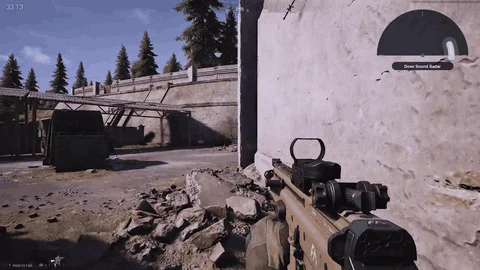
Which headphone mode should you start with?
- Stereo
- Start here to establish how the game already places sound, especially if it offers its own headphone or binaural mode.
- Windows Sonic for Headphones
- Use the built-in Windows option for the first spatial comparison.
- Dolby Atmos for Headphones
- Try it on the same output when it is available through Dolby Access. Compare the same game and routes before deciding.
Run a test you can repeat
- Confirm your game is playing through the headphones you selected in Windows. Pause optional surround in the headset app first.
- Have a friend choose a direction before every test cue. Write down your guess before they tell you where they were. Run ten cues per mode.
- Match listening levels as closely as you can. Compare correct guesses and recurring mistakes, such as front and back sounding alike.
- Repeat on a busier map. Keep the mode that helps across the situations you play most.
Use Footstep Lab to practise isolating direction. Finish the comparison inside your game, where its sound mix and spatial processing can affect the result.
If you miss the same directions in several setups, use the directional hearing walkthrough to narrow down the problem.
What to do if sound direction gets worse
If front and back become harder to separate, return to the stereo baseline and check whether the game, Windows, and your headset app each have a surround mode active. Compare one spatial processor at a time. Once direction is reliable, use the Equalizer APO setup guide if you still want to reduce masking or change how loud different frequencies sound.
What to record in your stereo, Sonic or Atmos comparison
Leave in-game levels and any EQ in the same state between attempts. If two modes score about the same, repeat a second block before attributing the difference to the renderer.
Frequently asked questions
Is Dolby Atmos always better for footsteps?
Results vary by game and headset. Compare direction accuracy on the same route and at a similar listening level.
Should I use Windows Sonic with my headset’s virtual surround?
Start with one spatial mode at a time. That gives you a clean comparison and makes it easier to identify which setting changed the result.
Can EQ fix front and back sounding the same?
EQ changes the level of frequency bands. Check channel routing and spatial settings first, then retest in the game.