
Overwatch Audio Settings for Footsteps and Direction on PC (2026)
For cleaner Overwatch audio, lower music first and keep ability and ultimate cues audible. Use a custom game to check whether you can place an enemy around a corner or above you before changing your EQ.
NodeEQ for Windows
Tune footstep clarity without losing ability cues
NodeEQ lets you see the spectrum as you adjust your headset EQ in Windows. Change one band, use bypass, and replay the same custom-game route so you can hear what happens to both footsteps and abilities.
Start with a small cut if rumble covers movement. The spectrum, filter controls and bypass are all in the same view.
Get NodeEQ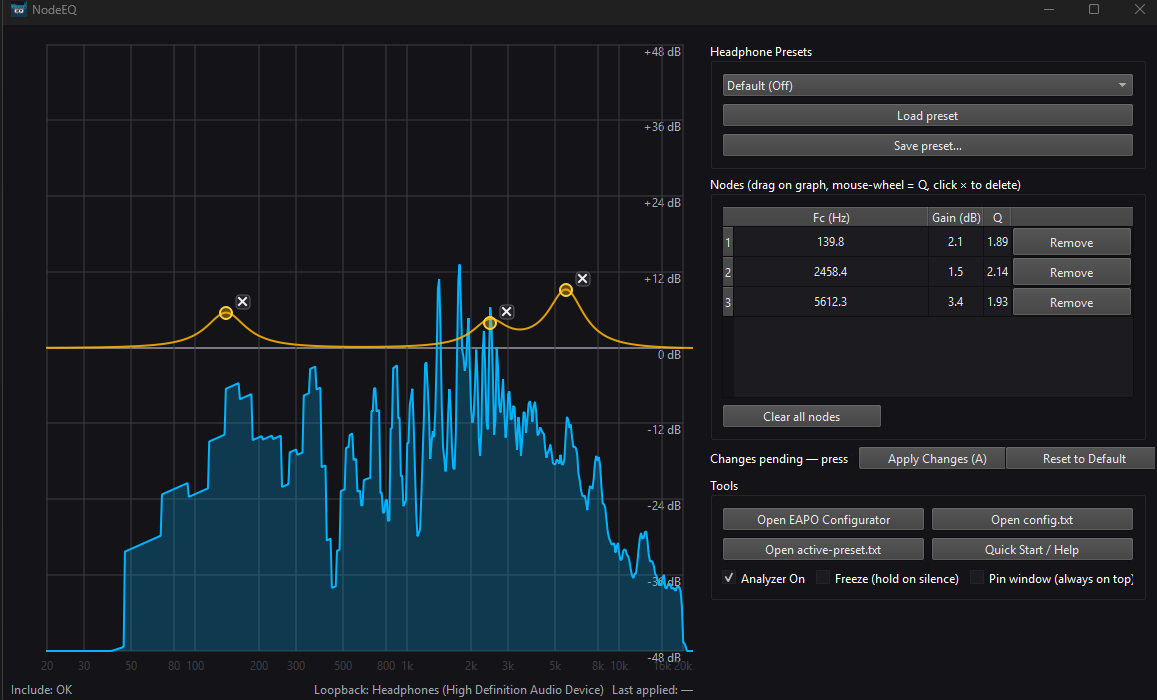
Make room for flank cues in the game mix
Lower music before touching overall effects. Effects carry useful information well beyond footsteps, including weapons and abilities. Keep voice cues and team chat audible enough that you can still react to a callout during a fight. Blizzard added separate controls for teammate and enemy eliminated sound effects under Sound, General, Sounds in its June 30 update. If those cues crowd your mix, adjust them individually.
Test a flank before you touch EQ
Get a friend on the enemy team in a custom game. Pick one hero and have them take two approaches, one from your side and one from a different height. Keep your camera fixed and call the route before you look. Repeat the same routes with a second audio mode at a similar volume. Check your answers after each pass.
Try a small headset EQ adjustment
If low rumble still covers movement, start with one small cut in the low end. Recheck the same hall and high-ground route, then listen to a team fight. Keep the change only if movement is easier to place and ability cues still sound familiar. On Windows, NodeEQ lets you adjust one band and compare it with bypass. If you want to isolate direction outside the game, try Footstep Lab.
See the Windows spatial audio comparison for a stereo, Sonic, and Atmos test you can repeat on the same headset.
Check whether the settings still work in a team fight
In a custom game, stand near the corner you normally hold. Have one friend approach from a side route while another uses an ability on the main lane. Run it three times with your normal mix and three times with the change. Count early flank calls and make sure you can still identify the ability cue.
If you catch more steps just because everything is louder, match the levels and run the test again. If voice chat is the sound burying the approach, lower chat a little before changing the whole effects mix.
Frequently asked questions
Should I use stereo or spatial sound in Overwatch?
Start with stereo. Compare one spatial mode and keep it if you can place flank and high-ground cues more reliably on your headset.
Will raising treble make every enemy step easier to hear?
Test a single small change. The same adjustment also changes weapons and abilities and can make busy fights harder to follow.
Should I lower effects to make footsteps easier to hear?
Lower music first and keep effects audible. Use a custom game to see whether footsteps and ability cues both remain easy to hear.