
Best Warzone Audio Settings & EQ Preset to Hear Footsteps (2026)
Footsteps in Call of Duty: Warzone can be hard to hear because explosions, gunfire, vehicles, killstreaks, and background noise constantly mask enemy movement. The goal of this guide is simple: make Warzone footsteps louder and clearer without turning every sound into a muddy mess.
This guide covers the best Warzone audio mix, the best EQ settings for Warzone footsteps, how to use loudness equalization, and how to apply the preset with NodeEQ, DoveSonicEQ, AutoSonic, or Equalizer APO.
Want the preset file? Download it here: WarzoneEQ.txt or browse all gaming EQ presets.
1) Best Warzone audio mix for footsteps
The biggest Warzone setting is Audio Mix. This controls how the game balances quiet sounds like footsteps against loud sounds like explosions and gunfire.
If you are using NodeEQ, DoveSonicEQ, AutoSonic, or Equalizer APO
- Use Treyarch Mix if it sounds natural on your headset.
- Use Headphones if Treyarch Mix sounds too processed or too sharp.
- Use NodeEQ loudness equalization around 70-80% for stronger quiet-footstep lift.
If you are already using an EQ preset and loudness equalization, you do not need the game to add even more aggressive processing. The EQ is already pushing the important footstep frequencies up, and the loudness slider is already bringing quiet movement closer.
If you are not using external audio software
- Use Sucker Punch for the strongest built-in footstep help.
- Try Headphone Bass Boost only if Sucker Punch sounds too flat.
- Avoid too much bass because deep explosions can cover footsteps.
Sucker Punch has a tighter dynamic range, which means quiet sounds like footsteps are raised while loud sounds are controlled. The tradeoff is that it raises more than just footsteps, so background noise can also become more noticeable.
2) Why Warzone footsteps get masked
When analyzing Warzone gameplay audio, the first problem is the huge amount of low-end energy. Explosions, distant gunfire, vehicles, and ambient effects create deep bass that can hide the lower part of footsteps.
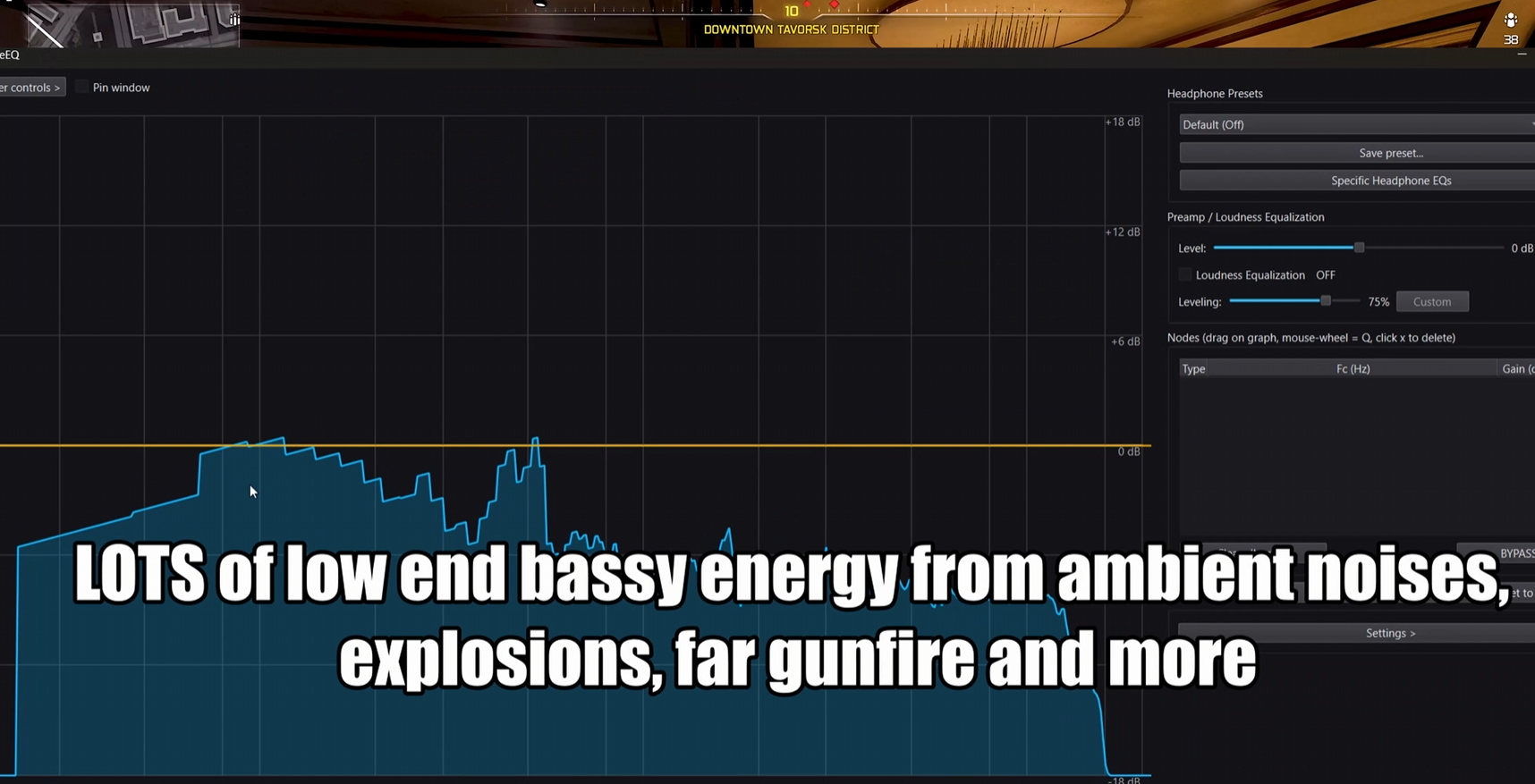
The fix is not just "make everything louder." The better approach is to pull back deep bass, then boost the areas where footsteps, gear movement, reloads, and surface detail appear.
3) Best Warzone EQ preset for footsteps
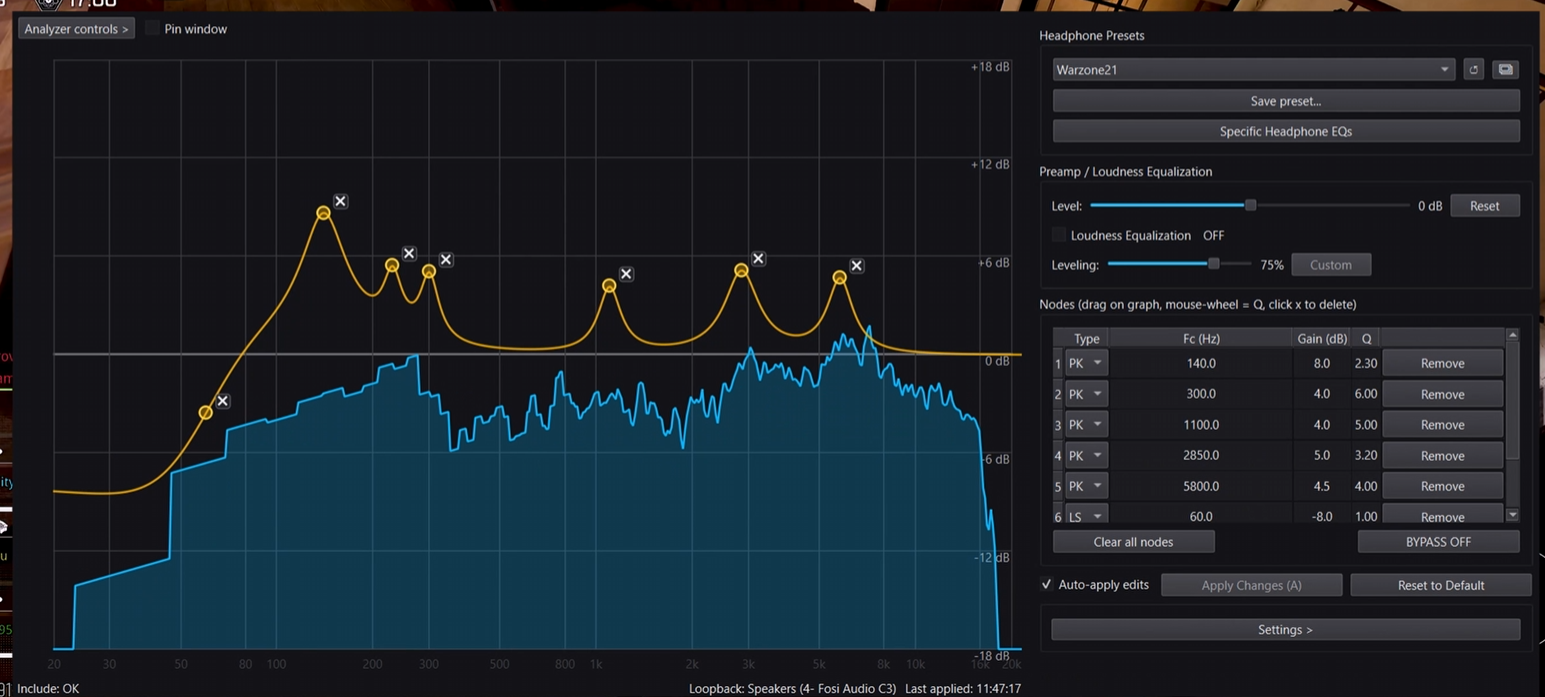
This is the Warzone EQ preset from the video, formatted for Equalizer APO and used by NodeEQ. It reduces deep bass that masks footsteps, then boosts the low-mid body and higher texture of enemy movement.
Warzone Footstep EQ preset
- Preamp: 0.0 dB
- 60 Hz low shelf: -8.0 dB, Q 1.00
- 140 Hz: +8.0 dB, Q 2.30
- 230 Hz: +3.5 dB, Q 6.00
- 300 Hz: +4.0 dB, Q 6.00
- 1100 Hz: +4.0 dB, Q 5.00
- 2850 Hz: +5.0 dB, Q 3.20
- 5800 Hz: +4.5 dB, Q 4.00
The 60 Hz cut helps reduce rumble from explosions and background chaos. The 140-300 Hz boosts bring out the weight and body of footsteps. The 1.1 kHz, 2.85 kHz, and 5.8 kHz boosts add texture, gear movement, reload detail, and sharper enemy movement cues.
Download the preset directly: WarzoneEQ.txt.
4) NodeEQ loudness equalization for Warzone
Warzone is loud, so EQ alone is not always enough. In NodeEQ, loudness equalization can run at the same time as the EQ preset. For Warzone, the best starting point is usually 70-80%.
- 60%: more natural, less aggressive
- 70-80%: best balance for louder footsteps
- 90-100%: very strong, but can crush game dynamics
The goal is to bring footsteps up without completely flattening the game. If everything starts sounding equally loud, lower the loudness slider until distance and direction feel more natural again.
5) How to apply the Warzone EQ preset
NodeEQ or DoveSonicEQ
- Download WarzoneEQ.txt or open the built-in preset list.
- Open NodeEQ or DoveSonicEQ.
- Click Open Presets Folder.
- Drop the preset file into the folder.
- Click Refresh, select the Warzone preset, then click Apply.
- Set loudness equalization around 70-80% if you want stronger footsteps.
AutoSonic
- Open AutoSonic.
- Use the Warzone preset if it is already included, or import
WarzoneEQ.txt. - Apply the preset through Equalizer APO.
- Use Listen mode if you want AutoSonic to suggest extra tuning for your headset.
Equalizer APO
- Download WarzoneEQ.txt.
- Copy it to
C:\Program Files\EqualizerAPO\config. - Open
config.txt. - Add
Include: WarzoneEQ.txt. - Save, then restart audio or reboot if needed.
6) Best in-game Warzone audio settings
After choosing the right audio mix, keep the rest simple. You want useful combat sound high and distracting non-combat sound low.
- Audio Mix: Treyarch Mix or Headphones with EQ; Sucker Punch without EQ
- Effects Volume: high / 100
- Music Volume: 0 or very low
- Cinematic Music: low or off
- Dialogue Volume: personal preference, but keep it below effects if it masks footsteps
- Voice Chat: personal preference, but do not let teammates bury footstep cues
If footsteps still feel buried, do not immediately add more bass. In Warzone, bass-heavy mixes can make explosions and distant chaos louder, which is exactly what masks footsteps in the first place.
7) Extra edge: headphones and visual direction
Headphones or IEMs that naturally emphasize the same footstep regions can make Warzone easier before EQ is even applied. If your headset is extremely bass-heavy, you may need a stronger low-bass cut to stop explosions from covering movement.
NodeEQ
Best if you want the Warzone EQ preset, live spectrum analyzer, preset importing, and loudness equalization in one Windows app.
View NodeEQSoundSight
If directional audio still feels confusing, SoundSight can show left/right sound direction visually while you play.
View SoundSightFAQ
What is the best audio mix for Warzone footsteps?
If you use EQ and loudness equalization, start with Treyarch Mix or Headphones. If you are not using any external audio software, try Sucker Punch because it has a tighter dynamic range and brings quiet footsteps forward.
How do I hear footsteps better in Warzone?
Lower music, keep effects high, use the right audio mix, reduce deep bass masking, and boost the low-mid plus upper-detail frequencies where footsteps and character movement sit.
Is Sucker Punch better than Headphones in Warzone?
Sucker Punch is better if you want the game to process quiet sounds for you. Headphones or Treyarch Mix can be better if you are already using NodeEQ, DoveSonicEQ, AutoSonic, or Equalizer APO because your EQ and loudness settings are already doing the footstep work.
Should I use Headphone Bass Boost?
Try it only if your setup sounds too thin. Bass boost can make Warzone feel powerful, but too much bass can hide footsteps behind explosions, vehicles, and distant gunfire.
Does EQ really help Warzone footsteps?
Yes. EQ helps because footsteps occupy specific frequency areas. Boosting those areas and reducing masking bass can make movement, gear shifting, reloads, and surface detail easier to hear.