
Best Modern Warfare 4 Audio Settings & EQ to Hear Footsteps (2026)
Footsteps in Modern Warfare 4 are easy to miss with all the gunfire, explosions and everything else going on. The right Audio Mix keeps the game from fighting your EQ, and a targeted EQ makes steps stand out a lot more.
This guide covers the best MW4 audio settings, the exact MW4 footstep EQ preset, and the tested Loudness Equalization setting. You can download the preset for free, or apply it, analyze the game in real time and refine it for your headphones directly with DoveSonicEQ.
Load this setup in one click with DoveSonicEQOr let Dove AI do it for you
1) Best Modern Warfare 4 audio settings
The most important setting is Audio Mix. Set it to Headphones, especially if you use an EQ and Loudness Equalization like the setup below. Other mixes add their own compression and tone, which works against a footstep EQ.
- Audio Mix: Headphones
- Effects Volume: High, since footsteps are carried in effects
- Music Volume: Low or off
- Dialogue Volume: Low
- Windows or headset virtual surround: Off, so you don't stack extra processing
That's really it for the in-game side. The rest of the improvement comes from the EQ and Loudness Equalization.
2) Footstep frequencies in Modern Warfare 4
After analyzing a lot of MW4 footsteps, the same pattern showed up. Like most games, there's a lot of deep low end that doesn't help at all. Far-away gunfire and explosions sit down there and mask the steps right in front of you.
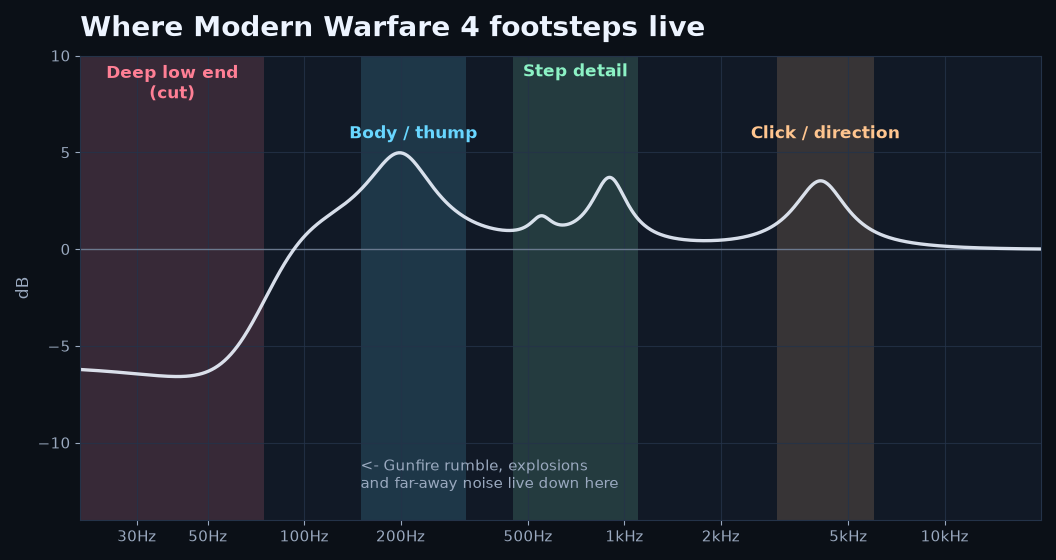
- Under 75 Hz: rumble from gunfire and explosions, so it gets pulled back heavily
- Around 200 Hz: the body of the footstep, the weight and thump
- Around 550 Hz: a tiny lift for fullness
- Around 900 Hz: where a lot of the footstep detail stands out from everything else
- Around 4 kHz: the click and texture that give clarity and help with direction
3) Best Modern Warfare 4 EQ preset for footsteps
This preset was made by recording and analyzing MW4 footsteps in DoveSonicEQ, then testing it by ear in real matches. It's a strong general starting point for most headphones.
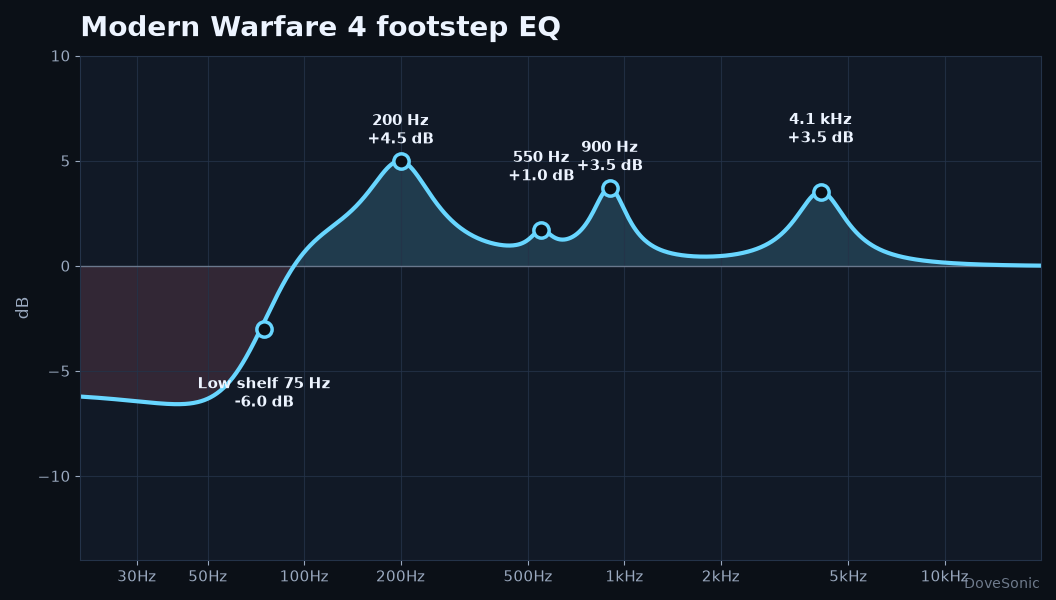
Modern Warfare 4 Footstep EQ
- 75 Hz low shelf: -6.0 dB, Q 1.10
- 200 Hz: +4.5 dB, Q 1.60
- 550 Hz: +1.0 dB, Q 5.00
- 900 Hz: +3.5 dB, Q 3.00
- 4100 Hz: +3.5 dB, Q 2.00
The low shelf clears the rumble that masks steps. The 200 Hz boost gives footsteps their weight, 900 Hz pulls the detail forward, and 4.1 kHz adds the click that makes them easier to place.
Download the free Modern Warfare 4 EQ preset
How the MW4 EQ compares to other games
MW4 needs less low-end cutting than Battlefield 6 or Escape from Tarkov. Its steps have a clear low thump, so the EQ leans on the 200 Hz body instead of cutting everything under 100 Hz. Battlefield 6 steps sit higher in the mids, and Tarkov needs more top-end detail.
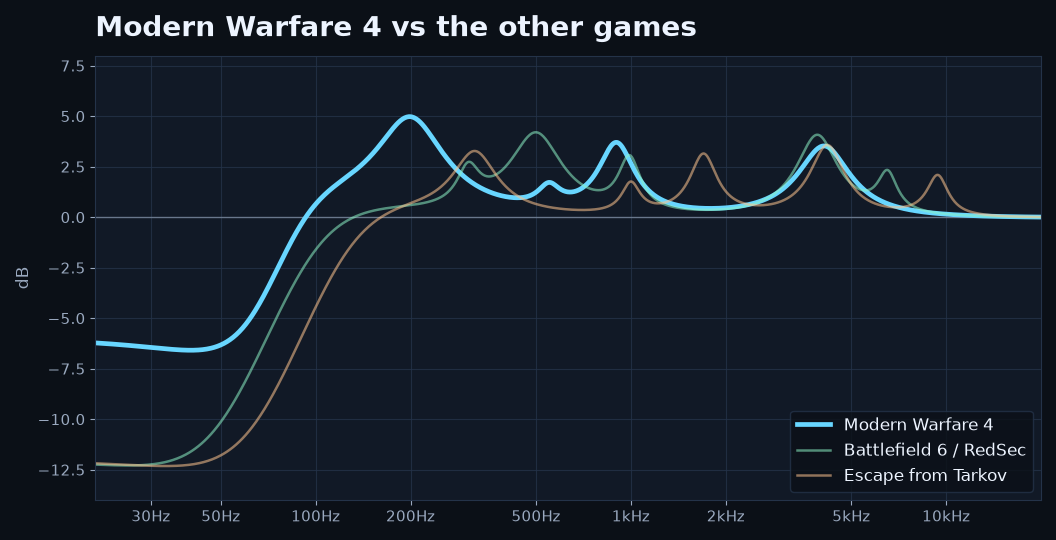
See the Battlefield 6 guide and the Escape from Tarkov guide for those presets.
4) How to apply the Modern Warfare 4 EQ
Skip the manual setup: get this whole Modern Warfare 4 setup in one click
Everything in this guide (the footstep EQ, the Loudness Equalization level and the fixes for loud gunfire) was made and tested in DoveSonicEQ. Instead of typing values into an equalizer, you can just load it.

DoveSonicEQ
The system-wide gaming equalizer this guide was built in.
- Game footstep presets ready to load, including Modern Warfare 4
- Headphone-tuned game EQs: pick your headset, pick your game
- Loudness Equalization with a Leveling % slider (set it to 40%)
- Volume Lock and Own Gunfire Control so your own shots stop blasting you
- Live spectrum, so you can actually see the footsteps
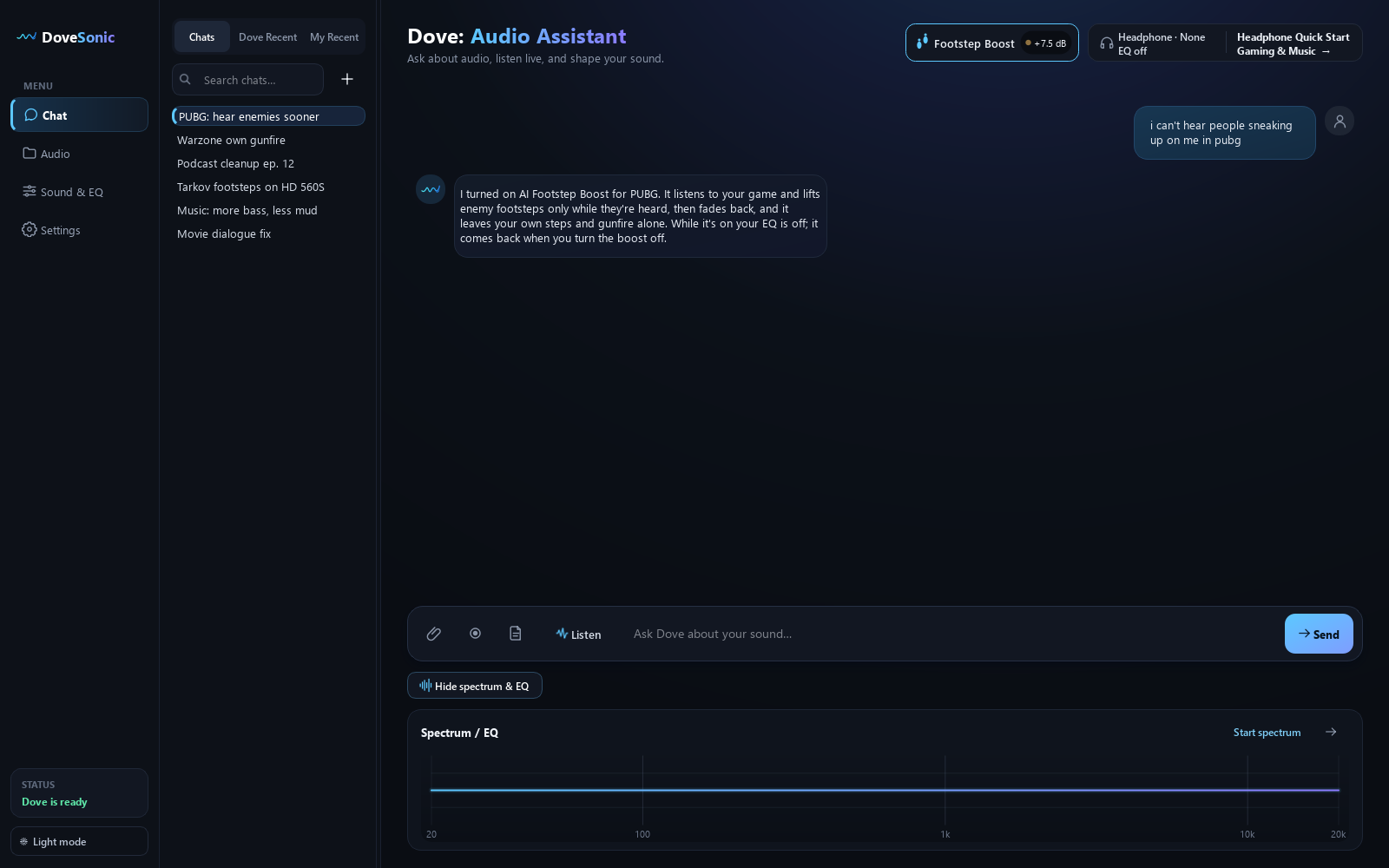
Dove: Audio Assistant AI
Just say "I can't hear footsteps in Modern Warfare 4" and it sets everything up.
- AI Footstep Boost: only enemy footsteps get louder, not gunfire or your own steps
- Sound Radar: see where footsteps and gunshots come from, on screen
- Matches the EQ to your exact headphones
- Includes everything in DoveSonicEQ
Prefer to do it yourself? The free preset download works in Equalizer APO or any parametric equalizer. Hear Footstep Boost before and after · See Sound Radar in a real match
Use DoveSonicEQ for the complete setup
DoveSonicEQ includes the MW4 preset ready to go, plus versions tuned to specific headphones, a live spectrum and editable EQ, built-in Loudness Equalization, and the Dove AI EQ assistant.
- Open DoveSonicEQ and select the Modern Warfare 4 preset
- Pick the headphone-tuned version if your model is listed
- Set Loudness Equalization to 40%
- Set Audio Mix to Headphones in MW4
- Use the live analyzer or Dove AI assistant for small tweaks
Use the free preset in another equalizer
The download above is a standard Equalizer APO text file, so it also works in any equalizer that takes parametric values. Just enter the five bands listed in section 3.
5) Best Loudness Equalization setting for Modern Warfare 4
Loudness Equalization brings up quiet sounds like far-away footsteps while keeping loud sounds like your own gunfire under control. For MW4, around 40% was the sweet spot. Quiet steps are a lot easier to hear, but you can still tell how far away they are.
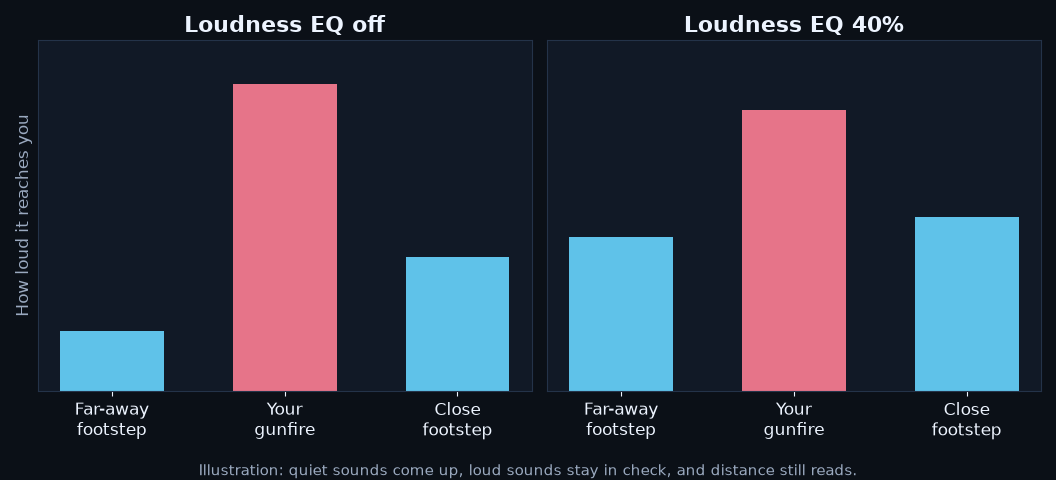
- Start at 40%
- Raise it if quiet steps are still hard to hear
- Lower it if everything starts sounding super close
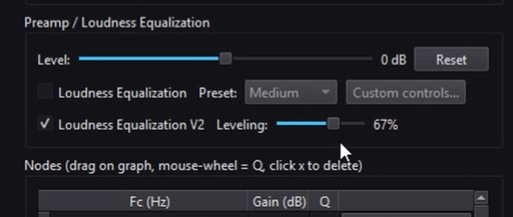
Where does the 40% come from?
It's the Leveling slider in DoveSonicEQ's Loudness Equalization. Windows' own Loudness Equalization has no strength setting at all. It's just on or off, and on is usually too much: everything sounds close and you lose distance.
DoveSonicEQ lets you set exactly how much quiet sounds get lifted, runs it together with the Modern Warfare 4 EQ, and adds Volume Lock so your own gunfire stays in check.
Quick recap
- Load the Modern Warfare 4 EQ
- Set Loudness Equalization to around 40%
- Set Audio Mix to Headphones
FAQ
What is the best Audio Mix in Modern Warfare 4?
Headphones. It gives the cleanest base for an EQ and Loudness Equalization without the game adding its own compression on top.
Does EQ help footsteps in MW4?
Yes. Pulling back the deep rumble from gunfire and explosions, then boosting the footstep body, detail and click ranges, makes steps stand out much more clearly.
Why 40% Loudness Equalization?
It lifts quiet steps without making everything sound close. Higher settings make it harder to judge distance. Treat 40% as a starting point and adjust for your headphones.
Is there a headphone-specific MW4 EQ?
Yes. DoveSonicEQ includes Modern Warfare 4 versions tuned to specific headphones. The free download here is the general version that works on most headphones.