
Best Rainbow Six Siege Audio Settings & EQ to Hear Footsteps (2026)
Footsteps in Rainbow Six Siege are one of the most important pieces of information in the game. Hearing an enemy rotate above you, move down a hallway, or approach a doorway even half a second earlier can decide the round.
This guide covers the best Rainbow Six Siege audio settings, the best EQ preset for footsteps, and how to apply it using NodeEQ, AutoSonic, or Equalizer APO.
1) Best Rainbow Six Siege audio settings
The most important audio option in Rainbow Six Siege is Dynamic Range. This setting controls how loud quiet sounds are compared to explosions and gunshots.
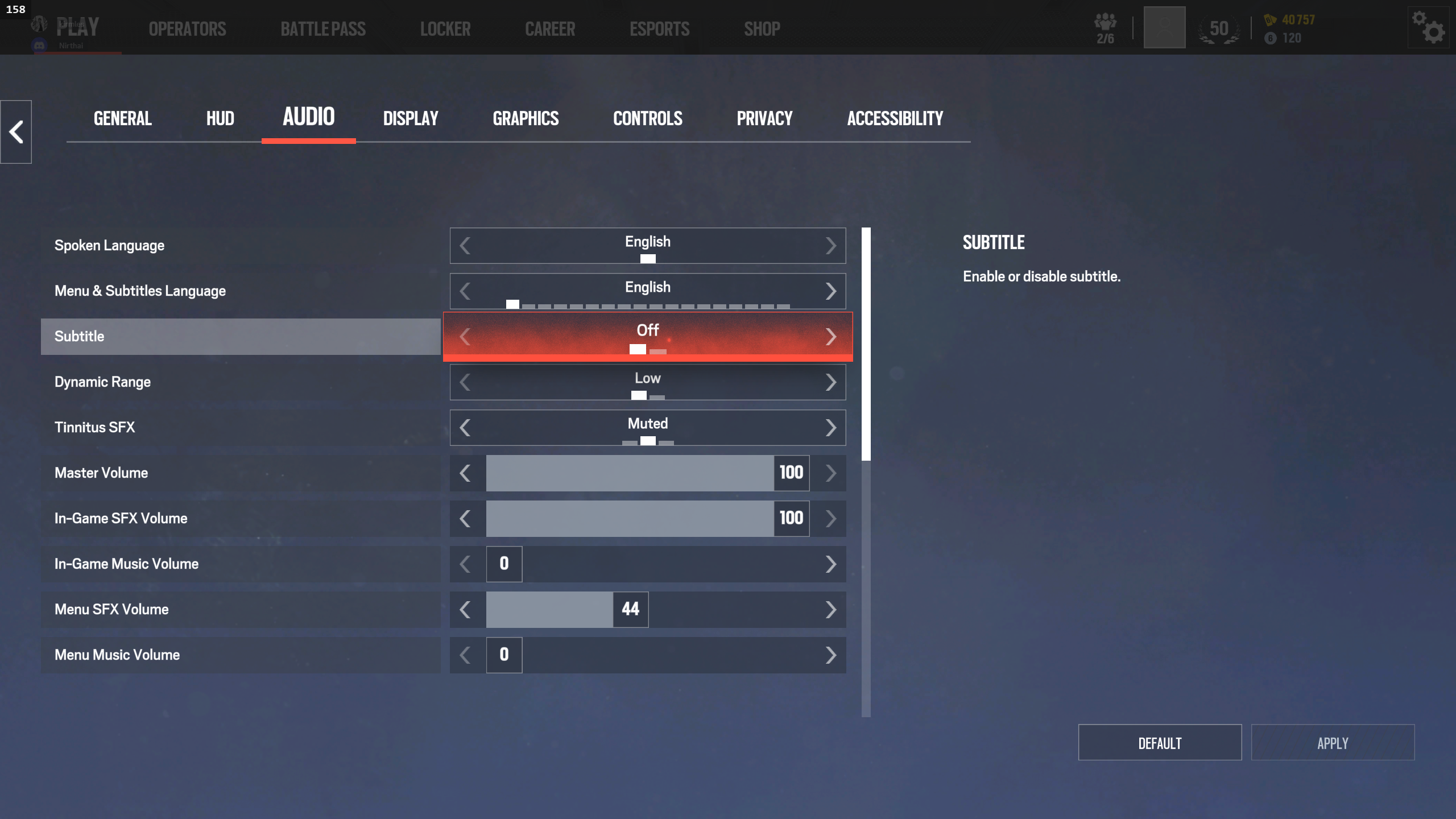
Dynamic Range
- Low: best for hearing footsteps
- High: more realistic but explosions may mask footsteps
Dynamic range mainly reduces the loud peaks from explosions and gunfire so quieter sounds like footsteps remain audible. Many competitive players prefer Low dynamic range because it prevents loud sounds from masking enemy movement.
2) Footstep frequencies in Rainbow Six Siege
Footsteps in Siege have a very strong presence in the low to low-mid range. Compared to many FPS games, Siege footsteps contain more bass and impact, which is why boosting these frequencies works so well.
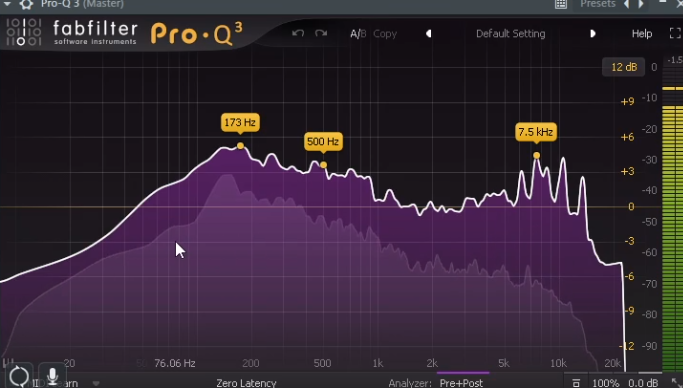
- 100–500 Hz: main body of footsteps
- 3–4 kHz: detail and surface texture
- 7–8 kHz: clarity and edge
Because Siege footsteps contain strong low-mid frequencies, boosting this area significantly increases how noticeable enemy movement becomes during gameplay.
3) Best Rainbow Six Siege EQ preset for footsteps
This is the EQ preset created after analyzing real Siege gameplay audio. It boosts the low-mid impact of footsteps while adding clarity in the upper ranges.
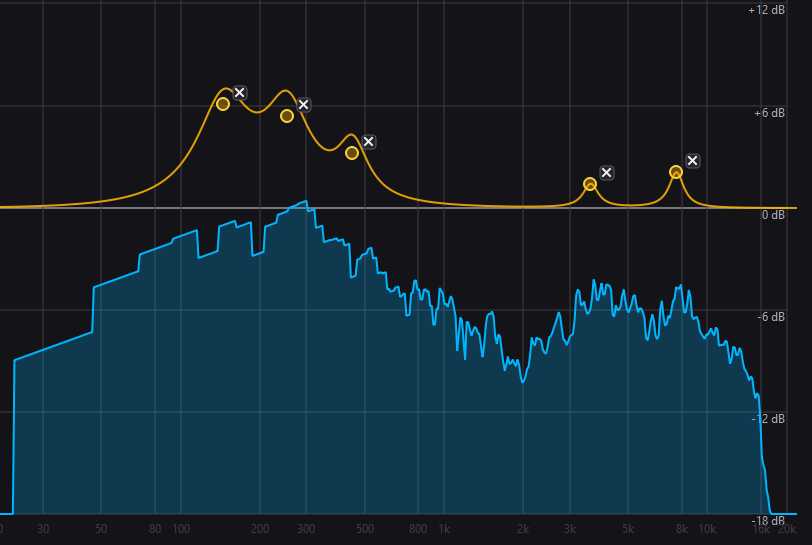
Rainbow Six Siege Footstep EQ
- 145 Hz: +6.1 dB
- 253 Hz: +5.4 dB
- 449 Hz: +3.2 dB
- 3595 Hz: +1.4 dB
- 7607 Hz: +2.1 dB
This EQ profile boosts the low-mid region heavily because Siege footsteps contain strong bass energy compared to other FPS titles. The higher boosts add clarity so footsteps stand out through gunfire and ambient sounds.
4) How to apply the Siege EQ preset
NodeEQ
- Download the Siege preset from EQ Presets
- Open NodeEQ
- Click Open Presets Folder
- Drag the preset file into the folder
- Click Refresh
- Select the preset and click Apply
AutoSonic
AutoSonic can automatically detect the main frequency areas of footsteps and build an EQ profile based on live game audio.
- Open AutoSonic
- Let it analyze gameplay audio
- Generate the EQ profile
- Apply the preset
5) Extra edge: SoundSight visual audio radar
Even with perfect audio settings, sometimes directional cues can still be confusing in chaotic fights. That’s where SoundSight helps.
SoundSight converts game audio into a visual radar overlay that shows the direction of footsteps, gunshots, and other sounds in real time.
- Shows direction of footsteps visually
- Works with any game including Rainbow Six Siege
- Footstep Focus mode highlights important sounds
If you want an extra advantage in Siege fights, SoundSight can make directional audio easier to interpret instantly.
FAQ
Are these the best Rainbow Six Siege audio settings?
These settings focus specifically on improving footstep clarity and positional audio. Competitive players usually prioritize hearing enemy movement over cinematic sound balance.
Does EQ actually help hear footsteps?
Yes. Footsteps exist in specific frequency ranges. Boosting those frequencies makes them easier to detect compared to explosions or environmental noise.
Does Loudness Equalization help in Siege?
It can make quiet sounds louder but also compresses audio heavily, which can make it harder to judge distance. Many players prefer EQ with normal dynamic range instead.