
Best Apex Legends Audio Settings & EQ to Hear Footsteps (2026)
Footsteps in Apex Legends can decide whether you catch an enemy rotation or get surprised at close range. The right in-game mix helps remove unnecessary sound, while a targeted EQ makes the important parts of enemy movement easier to pick out.
This guide covers the best Apex Legends audio settings, the exact Apex Legends footstep EQ preset, and a practical Loudness Equalization range. You can download the preset for free or apply and adjust it directly with DoveSonicEQ (or NodeEQ for a manual-only setup).
1) Best Apex Legends audio settings
Set Audio Mix to Focus. This mix prioritizes critical gameplay information, removes teammate footsteps, and reduces some of the sounds that can compete with enemy movement.
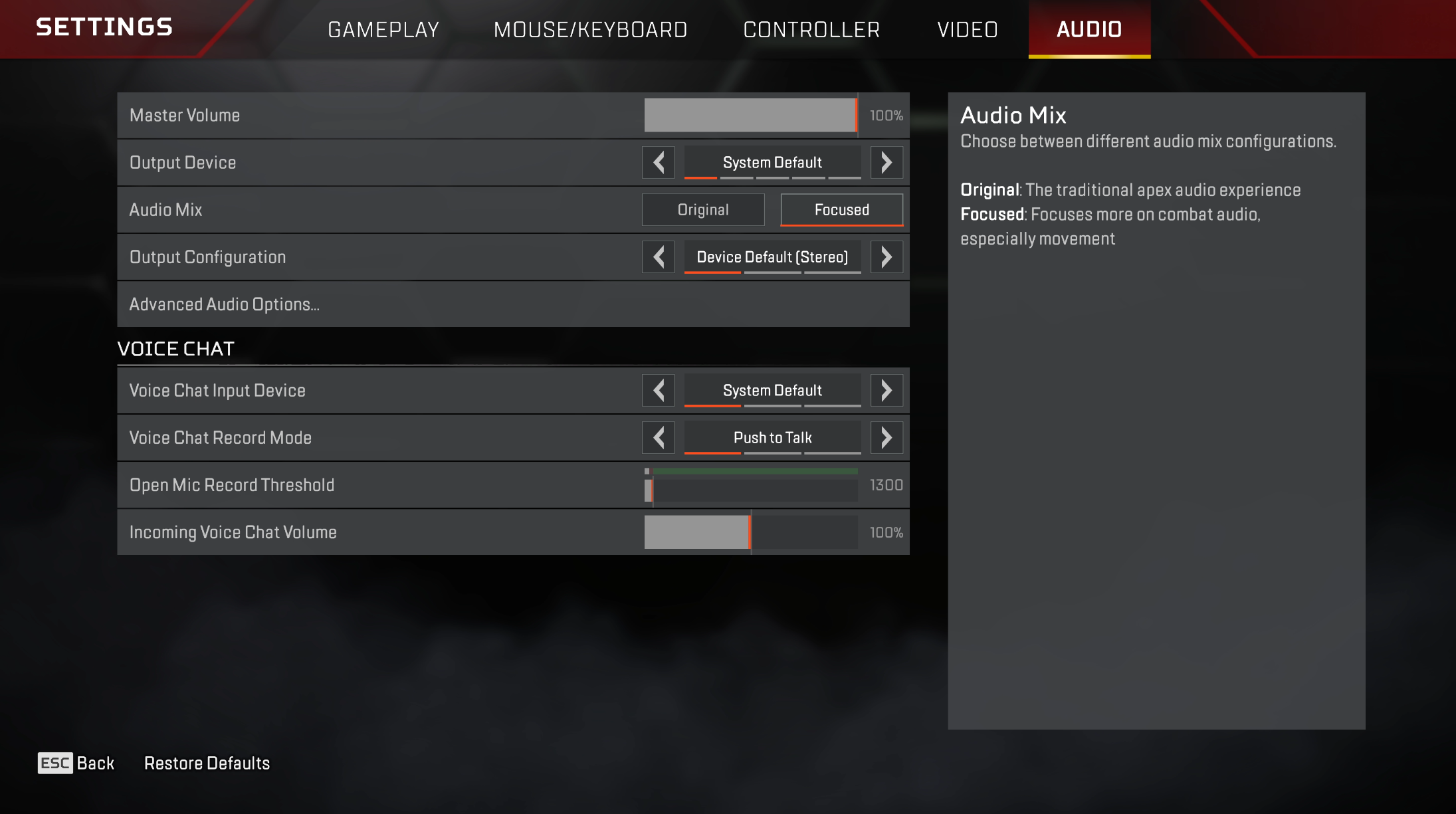
- Audio Mix: Focus
- Sound Effects Volume: High
- Dialogue Volume: Lower it slightly so callouts do not cover movement
- Music Volume: Low or Off
- Lobby Music Volume: Low or Off
The goal is not to make every sound louder. It is to keep the information you need—enemy movement, abilities, gunfire, and important callouts—while reducing audio that does not help during a fight.
2) Footstep frequencies in Apex Legends
Apex footsteps use several frequency areas at once. The low mids give each step weight, while the upper mids carry the sharper surface detail that helps movement cut through combat audio.
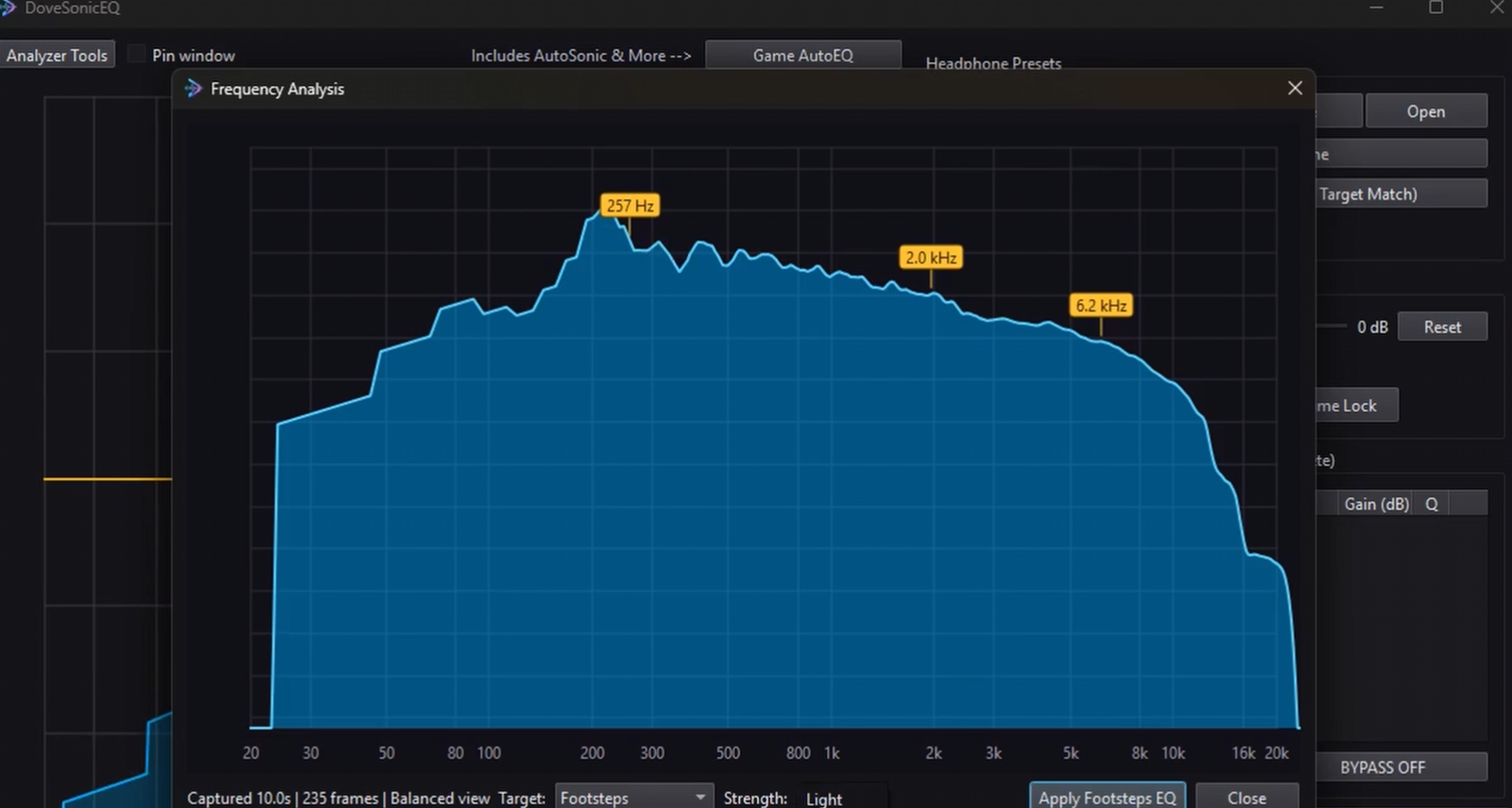
- Around 200-450 Hz: footstep body and impact
- Around 1 kHz: presence
- 2.3-3.8 kHz: texture, edge, and movement detail
- Very low bass: reduce it so rumble does not mask the useful ranges
That is why the preset below does more than apply one large treble boost. It reduces unnecessary sub-bass, strengthens the main body of the step, and then adds controlled upper-mid detail.
3) Best Apex Legends EQ preset for footsteps
This preset was created by analyzing Apex gameplay with the live spectrum and then testing the result by ear. Use it as a strong general starting point; small adjustments may still help with unusually bass-heavy or bright headphones.
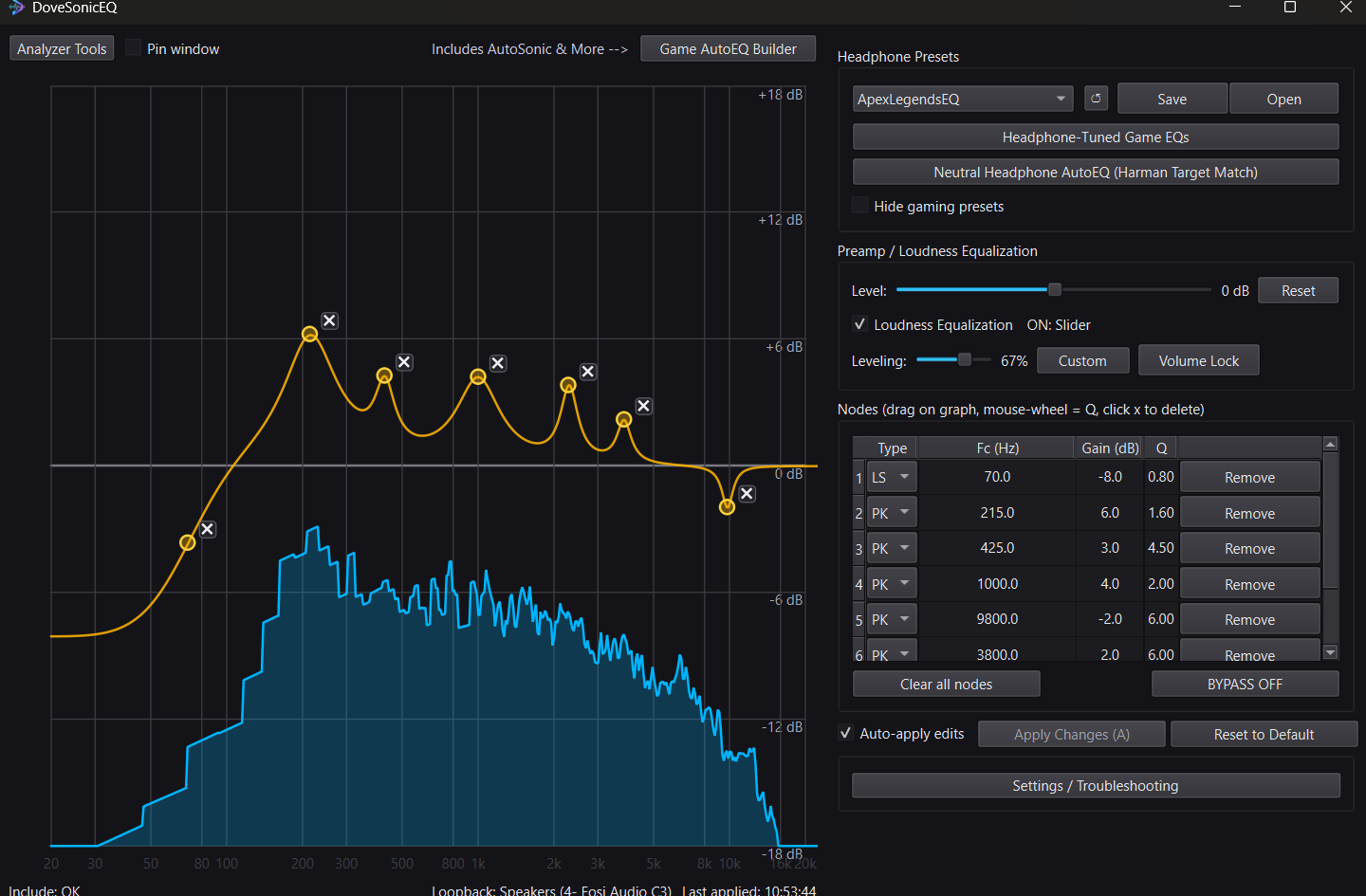
Apex Legends Footstep EQ
- 70 Hz low shelf: -8.0 dB, Q 0.80
- 215 Hz: +6.0 dB, Q 1.60
- 425 Hz: +3.0 dB, Q 4.50
- 1000 Hz: +4.0 dB, Q 2.00
- 2300 Hz: +3.5 dB, Q 5.00
- 3800 Hz: +2.0 dB, Q 6.00
- 9800 Hz: -2.0 dB, Q 6.00
The 70 Hz reduction clears away deep rumble. The boosts from 215 Hz through 1 kHz restore the body and presence of footsteps, while 2.3-3.8 kHz makes the finer movement detail easier to identify. The small 9.8 kHz reduction keeps the result from becoming excessively sharp.
4) How to apply the Apex Legends EQ
Use DoveSonicEQ for the complete setup
DoveSonicEQ includes the Apex Legends preset, a live spectrum and editable EQ, built-in Loudness Equalization, headphone-specific game presets, and the Dove AI assistant. Open DoveSonicEQ, pick the Apex preset, and adjust loudness to taste.
Use NodeEQ for a fast manual setup
NodeEQ gives you a live spectrum, editable EQ nodes, and system-wide application through Equalizer APO. It is the straightforward option if you want to load this preset, see what each band is doing, and fine-tune it for your own headphones.
- Download the Apex preset above
- Open NodeEQ and click Open Presets Folder
- Move the preset file into that folder
- Click Refresh, select the preset, and click Apply
- Use the live analyzer while Apex is playing to make small adjustments
5) Best Loudness Equalization setting for Apex Legends
Loudness Equalization raises quiet sounds and controls loud peaks. In Apex, a setting around 60-65% gives a useful balance: distant and quiet movement becomes easier to notice without completely flattening the sense of distance.
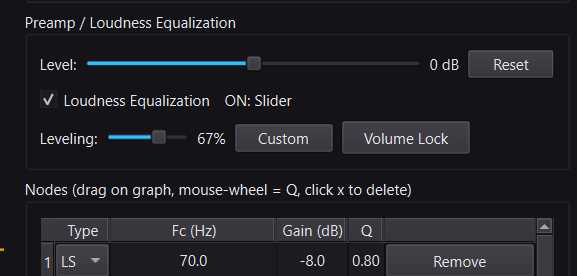
- Start at 60%
- Increase slightly if distant footsteps remain too quiet
- Reduce it if every sound begins to feel equally close
- Combine it with the EQ preset instead of using maximum compression
DoveSonicEQ includes this as a built-in slider, so you can compare EQ only against EQ plus Loudness Equalization without leaving the app.
FAQ
What is the best Apex Legends audio mix for footsteps?
Use Focus. It prioritizes critical gameplay audio, removes teammate footsteps, and reduces some unnecessary sounds that can mask enemy movement.
Does EQ help footsteps in Apex Legends?
Yes. EQ can reduce low-frequency rumble and emphasize the low-mid and upper-mid ranges that carry the body and detail of footsteps. It cannot fix every audio-engine issue, but it can make useful movement cues more noticeable.
Should Loudness Equalization be at 100%?
Usually no. Maximum compression can make distant and nearby sounds feel too similar. Start around 60-65% and adjust based on how well you can still judge distance.
Should I use NodeEQ or DoveSonicEQ?
Use NodeEQ if you want a focused EQ and live-analyzer workflow. Choose DoveSonicEQ if you also want built-in Loudness Equalization, Game AutoEQ, volume tools, and integrated game/headphone presets.