
Best WARDOGS Audio Settings & EQ to Hear Footsteps (2026)
Footsteps in WARDOGS are essential for tracking enemies before they reach you. The right in-game settings preserve directional information, while a targeted EQ brings movement details forward through distant gunfire, explosions, and ambient noise.
This guide covers the best WARDOGS audio settings, the exact WARDOGS footstep EQ preset, and the tested Loudness Equalization setting. You can download the preset for free or apply it, analyze the game in real time, and refine it for your headphones directly with DoveSonicEQ.
1) Best WARDOGS audio settings
Set Effects Volume to maximum, because footsteps and other important movement cues are carried through the effects channel. Turn 3D Spatial Sound On so those sounds also provide useful directional information around you.
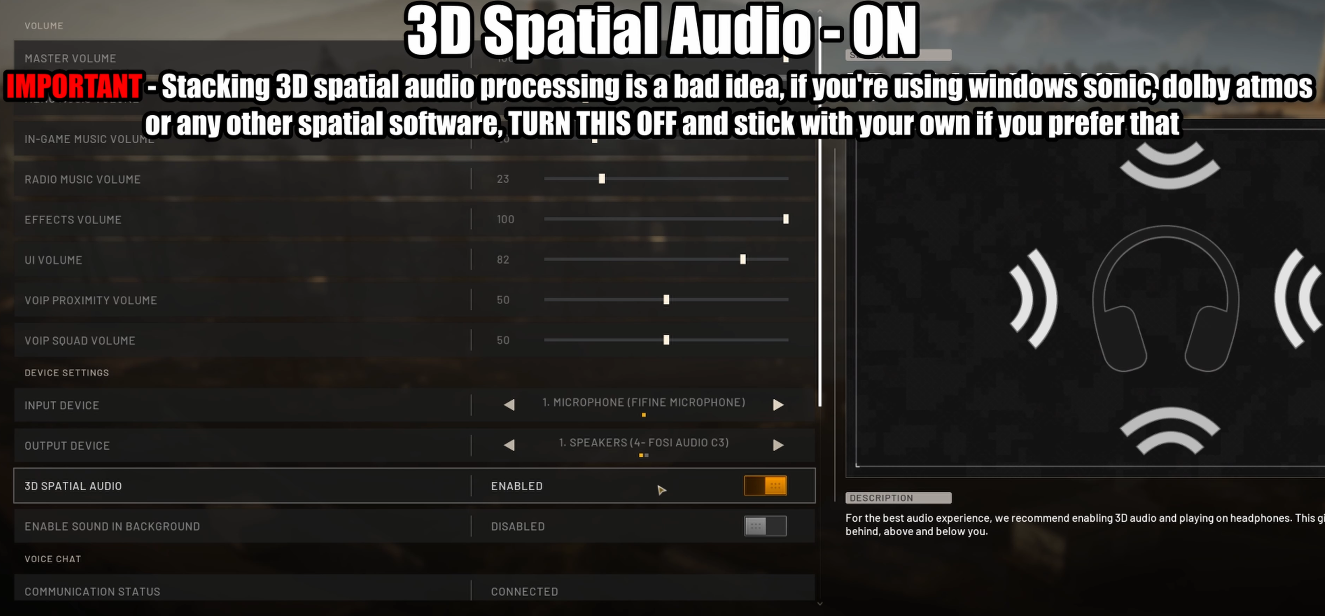
- Effects Volume: Maximum
- 3D Spatial Sound: On
- Music and nonessential audio: Lower it if it covers movement
- Extra spatial processing: Avoid stacking other surround effects
Volume makes footsteps easier to hear, but 3D Spatial Sound is what helps place enemies around you. Use both settings together before applying the EQ below.
2) Footstep frequencies in WARDOGS
WARDOGS footsteps and movement sounds contain useful information throughout the mids and higher frequencies. Those ranges carry presence, clarity, and directional detail, while heavy low-frequency gunfire and explosions can mask the cues directly in front of you.
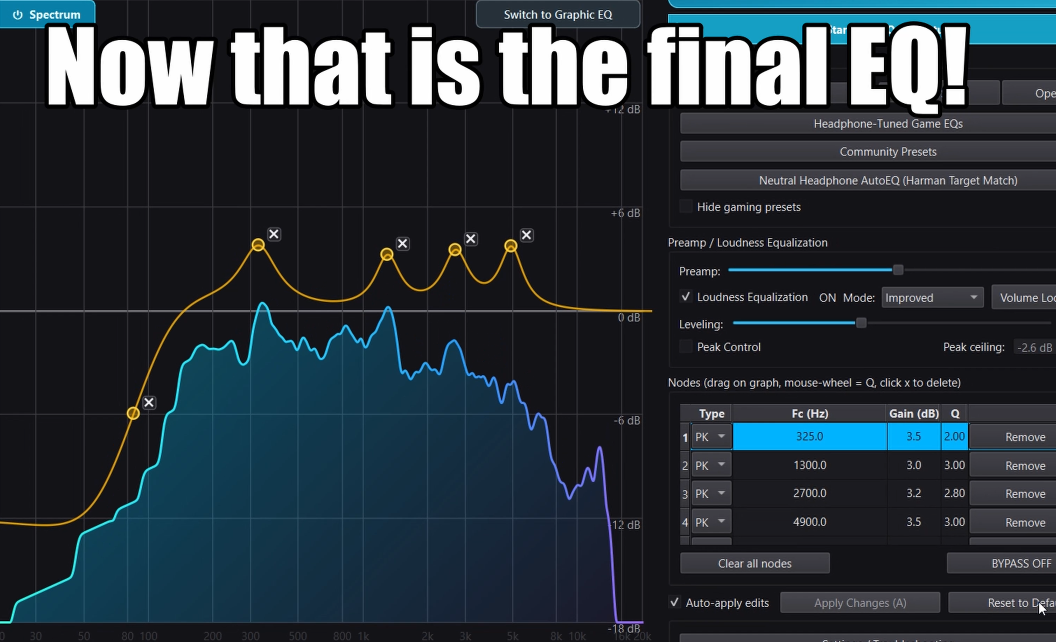
- Around 325 Hz: footstep body and presence
- Around 1.3 kHz: movement definition
- Around 2.7-4.9 kHz: clarity and directional detail
- Deep bass: reduce it so explosions and distant gunfire mask less detail
The preset therefore uses a strong low shelf rather than simply raising every frequency. It clears masking bass and applies controlled boosts only where the analyzed movement sounds need them.
3) Best WARDOGS EQ preset for footsteps
This preset was created by recording and analyzing different WARDOGS footsteps and movement sounds in DoveSonicEQ, then testing the result by ear. Use it as a strong general starting point; small adjustments may still help with unusually bass-heavy or bright headphones.
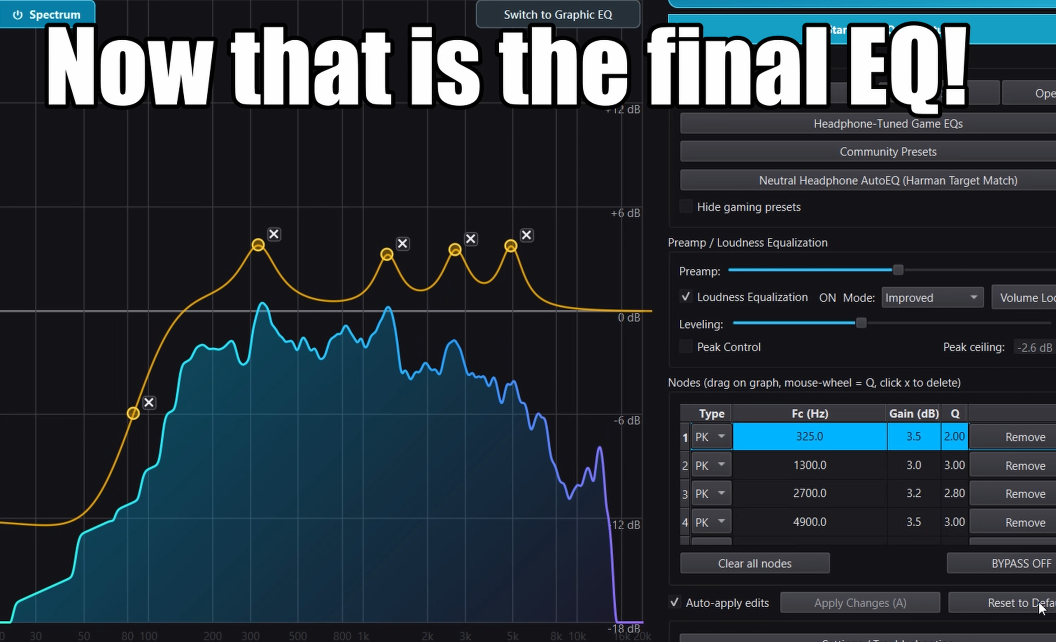
WARDOGS Footstep EQ
- 85 Hz low shelf: -12.0 dB, Q 0.89
- 325 Hz: +3.5 dB, Q 2.00
- 1300 Hz: +3.0 dB, Q 3.00
- 2700 Hz: +3.5 dB, Q 2.80
- 4900 Hz: +3.5 dB, Q 3.00
The 85 Hz shelf pulls back deep bass from explosions and distant gunfire. The 325 Hz and 1.3 kHz boosts reinforce footstep body and presence, while 2.7 kHz and 4.9 kHz bring forward the clarity and directional detail needed to track movement.
4) How to apply the WARDOGS EQ
Use DoveSonicEQ for the complete setup
DoveSonicEQ includes the WARDOGS preset, a live spectrum and editable EQ, built-in Loudness Equalization, headphone-specific game presets, and the Dove AI assistant for creating or refining a curve from your listening feedback.
- Open DoveSonicEQ and select the WARDOGS preset
- Choose a headphone-specific WARDOGS version if one is available for your model
- Apply the preset and test it with Effects Volume at maximum
- Use the live analyzer or Dove AI assistant for small refinements
- Keep 3D Spatial Sound enabled in the game
Use the free preset in DoveSonicEQ
Download the free preset above and import it directly into DoveSonicEQ. It gives you the complete WARDOGS curve, live analysis, AI refinement, headphone-specific choices, and Loudness Equalization together in one app.
5) Best Loudness Equalization setting for WARDOGS
Loudness Equalization raises quieter footsteps while keeping louder sounds under control. Testing found 40% to be the sweet spot for WARDOGS: quiet movement gets a useful boost without bringing up too much ambient noise or making enemy distance difficult to judge.
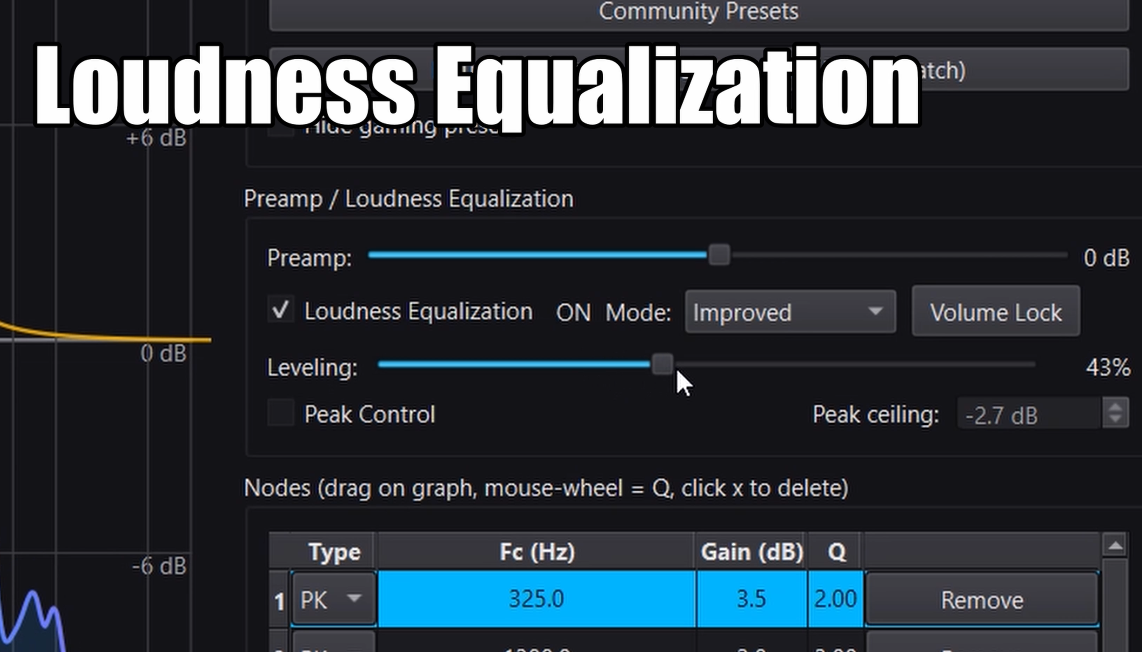
- Start at 40% in Refined mode
- Increase slightly if quiet footsteps remain too difficult to hear
- Reduce it if ambient noise becomes distracting
- Reduce it if nearby and distant enemies begin to sound too similar
DoveSonicEQ includes Loudness Equalization in the same app, so you can compare the EQ alone against the complete setup and adjust the result without leaving the game workflow.
FAQ
Should 3D Spatial Sound be on in WARDOGS?
Yes. Turn on the in-game 3D Spatial Sound option so footsteps provide clearer positional information instead of only becoming louder.
Does EQ help footsteps in WARDOGS?
Yes. EQ can reduce the deep bass from explosions and distant gunfire while emphasizing the mid and higher-frequency areas that carry movement presence, clarity, and directional detail.
Why use 40% Loudness Equalization?
Testing found 40% to lift quieter footsteps without raising ambient noise too aggressively or flattening the distance between nearby and faraway enemies. Treat it as a starting point and adjust slightly for your headphones.
Why use DoveSonicEQ for WARDOGS?
DoveSonicEQ combines the WARDOGS EQ, headphone-specific preset options, real-time analysis, Loudness Equalization, and Dove AI-assisted refinement in one workflow. Download the free preset above and open it in DoveSonicEQ to get started.