
Starts with proven factory game presets
Dove normally starts with the matching factory game profile, then refines it from what you hear or offers a headphone-tuned alternative when one is available.
A complete Windows audio-tuning suite for gaming, headphones, and everyday listening. Shape sound system-wide with a live parametric EQ, headphone-tuned game presets, Game AutoEQ, Loudness Equalization, headphone correction, and powerful analyzer tools. When you want guidance, the built-in Dove AI Audio Assistant can help choose, apply, troubleshoot, or create a setup through natural conversation.
By purchasing, you agree to our Terms of Service, Privacy Policy and Refund Policy.
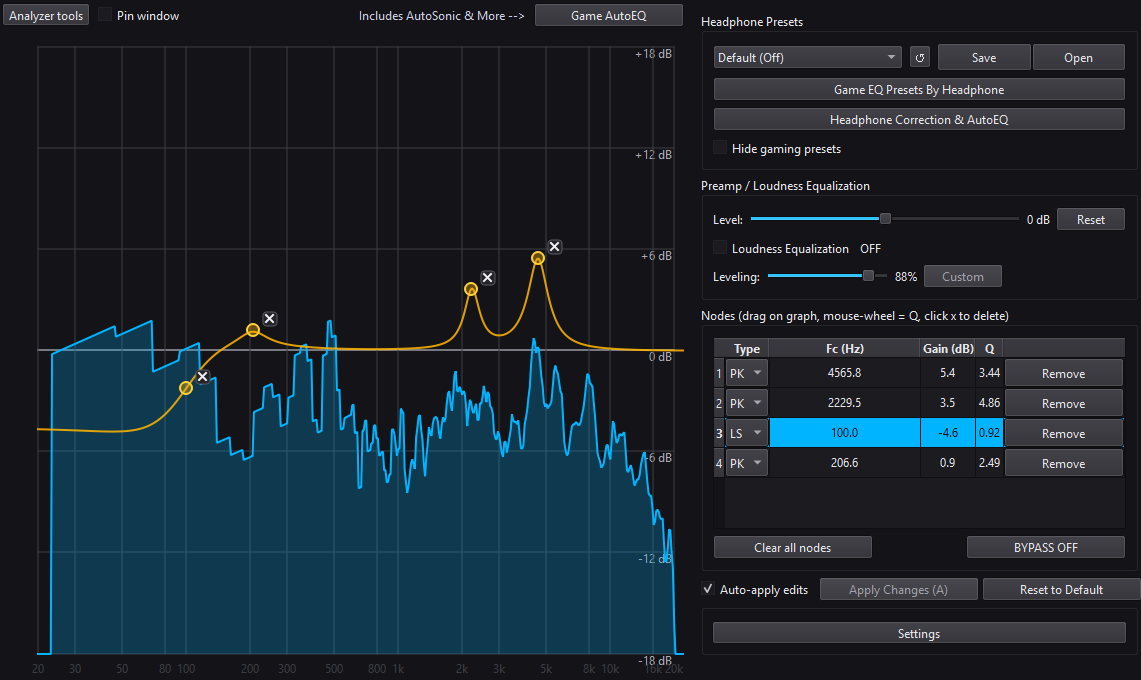
You do not need to memorize frequencies, compare every preset manually, or guess why Equalizer APO is not changing your sound. Tell Dove your game, headphones, and what you want to improve. It can inspect the relevant DoveSonicEQ state, search the included tuning library, explain its recommendation, and perform supported changes directly.
Dove is designed specifically around the visible features and supported workflows inside DoveSonicEQ—not as a generic chatbot pasted into an EQ app.

Dove normally starts with the matching factory game profile, then refines it from what you hear or offers a headphone-tuned alternative when one is available.
Ask for a custom tuning, test it in-game, then describe what feels wrong. Dove can refine the active bands conversationally and save only when you ask.
Load presets, set Loudness Equalization, apply supported processing, compare bypass, reset, and undo without digging through every panel yourself.
Dove can inspect relevant Equalizer APO attachment and configuration details, identify likely conflicts, and guide you through the fix in plain language.

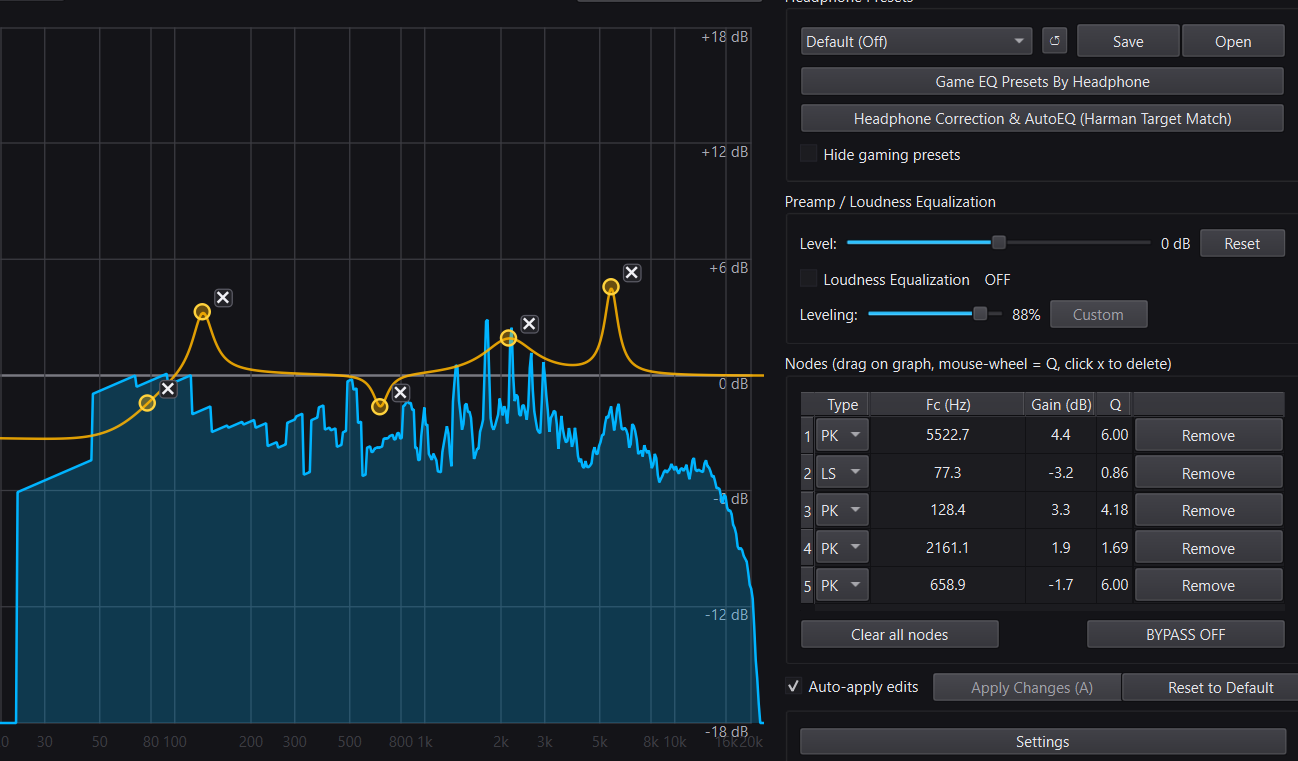
Drag EQ nodes directly on the analyzer, hear changes instantly, and apply them system-wide through Equalizer APO.
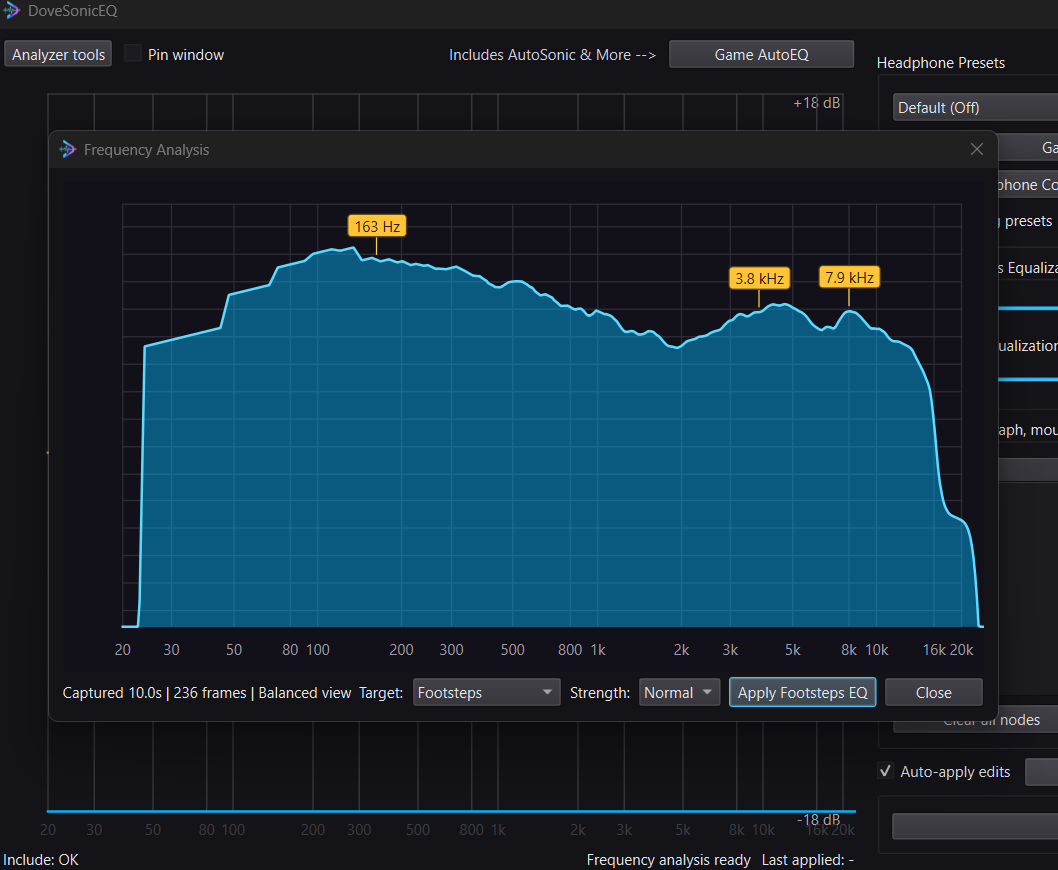
Play the scene you want to improve and Dove can analyze eight seconds of local game audio, use transient and masking evidence, and apply a custom footstep-EQ starting point for you.
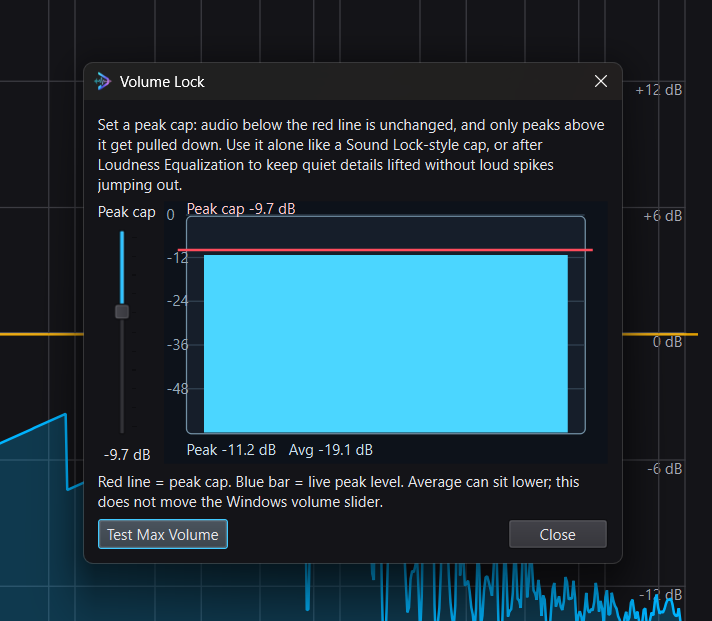
Set a hard maximum peak level so loud spikes stay controlled. Use it alone like a Sound Lock-style cap, or after Loudness Equalization to keep quiet details lifted without gunshots jumping out.
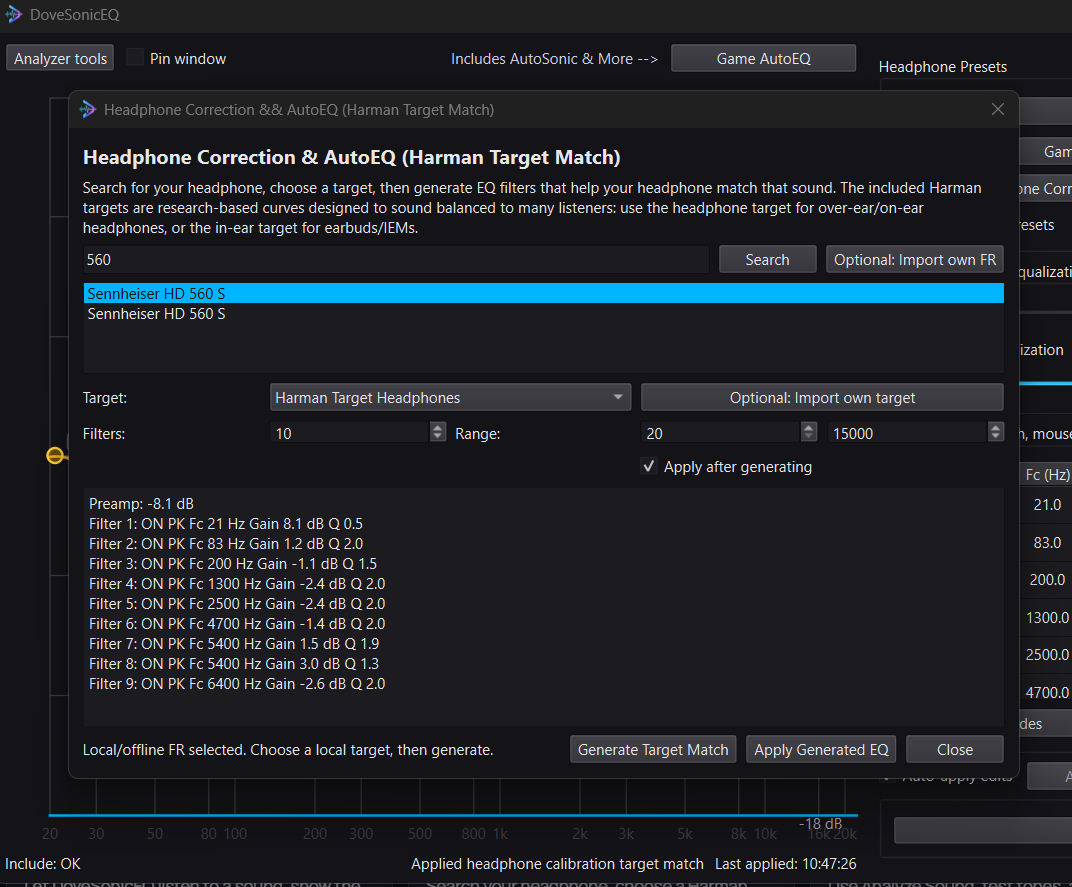
Search your headphone, choose a Harman target, and generate a cleaner correction profile for daily listening or gaming.
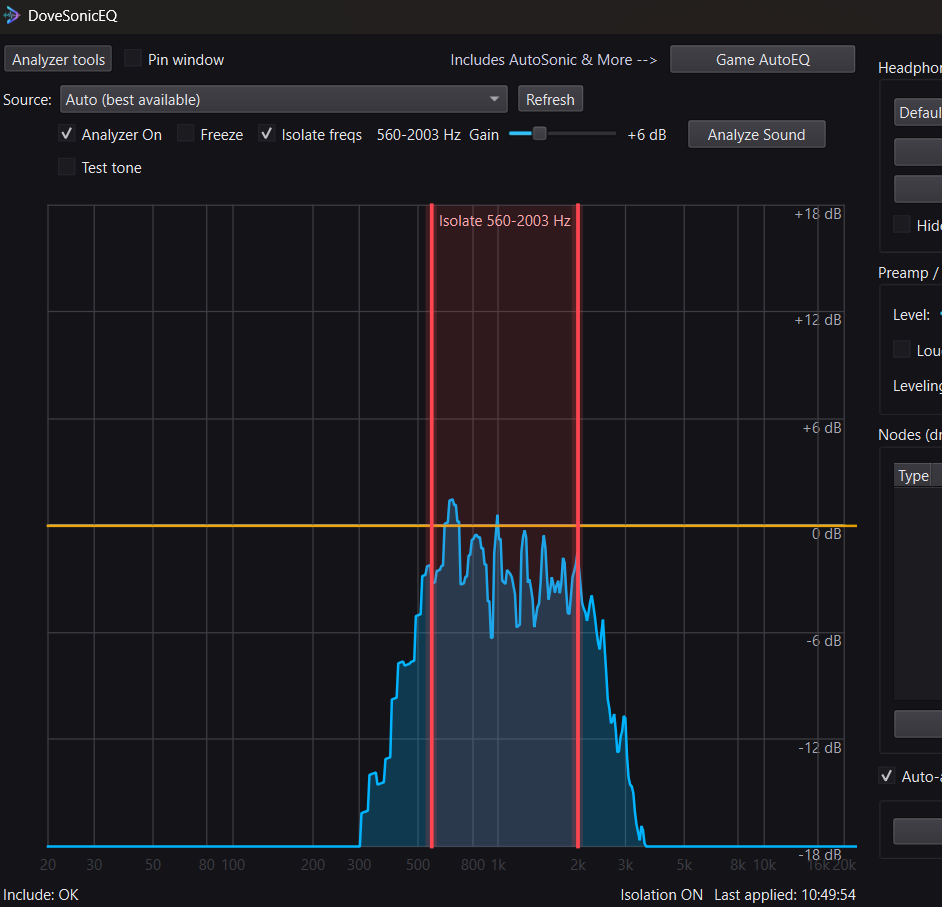
Use Analyze Sound, test tones, and frequency isolation to figure out what you are actually hearing before changing EQ.
DoveSonicEQ captures your Windows playback audio, shows it on a live spectrum, and writes EQ to Equalizer APO for system-wide output. Work manually, use Game AutoEQ or AutoSonic-style tuning, compare changes with Audio Loops, or generate headphone correction against built-in Harman targets. Dove can start with proven factory game presets, offer headphone-tuned alternatives, adjust supported controls, troubleshoot Equalizer APO, or build and refine a custom EQ with you.
Game AutoEQ is the fast tuning window. Start with a preset when one fits, or choose a listening mode and play the sound you care about so DoveSonicEQ can turn that capture into an EQ starting point.
Play an included gameplay clip or choose your own local video or audio file, place two markers around the sound you care about, and repeat that exact section while you compare EQ changes. Your selected media stays on your PC.
DoveSonicEQ also works as a headphone correction and target-matching tool. Search for your headphone, choose a target, and generate Equalizer APO filters to move that headphone toward the selected curve.
Isolate freqs gives you a draggable “only hear this range” band on the analyzer. It is useful for learning what part of a sound is actually footsteps, voice bite, harshness, rumble, or ambience before you decide what to boost or cut.
Dove is an audio assistant built around DoveSonicEQ. Ask naturally for the best setup for a game and headphone, help hearing footsteps, less harsh gunfire, a custom EQ, or help when Equalizer APO is not changing your sound. Dove can search included presets, inspect relevant settings, explain its choices, and perform supported actions directly in the app.
Yes. Dove AI Standard — Up to 12/day and 36/week.
Dove AI Plus — Up to 40/day · One shared message count · 30 days. Usage is shared between Classic and Improved; switching modes does not create another allowance. Standard includes two Dove Listens/day, while Plus includes five/day. Each listen also uses one message. Plus does not renew automatically.
Yes. Dove needs an internet connection to securely process a conversation through the DoveSonic server. Core local tuning tools remain available separately in DoveSonicEQ. See the Privacy Policy for details about AI processing.
It is the combined premium app: manual NodeEQ-style tuning, AutoSonic-style Game AutoEQ, headphone correction, target matching, analyzer tools, loudness controls, and Dove AI in one program.
Recommended. DoveSonicEQ uses Equalizer APO to apply EQ system-wide. Analyzer and design workflows can still be useful without it, but system-wide apply needs APO enabled on your playback device.
No for the normal workflow. DoveSonicEQ includes built-in Harman targets for headphones and in-ear monitors, and you can also import your own measurement or target if you want to go deeper.
It offers several ways to turn a short local PC-audio capture into an EQ starting point. Let Dove Listen analyzes eight seconds and can apply a custom footstep EQ, while Frequency Analysis and AutoSonic modes provide visual or automatic alternatives.
Manual EQ and Game AutoEQ work with any Windows playback device. Headphone correction works best when your headphone is available in the app or when you import your own measurement.
This download includes an optional Equalizer APO installer for convenience (© Jonas Thedering and contributors), which is distributed under the GNU General Public License v2 (GPLv2). Source code: Equalizer APO on SourceForge. Full license text: GPL-2.0. Equalizer APO is a separate work; DoveSonicEQ generates compatible configuration lines but is not derived from or linked to Equalizer APO’s code.
Equalizer APO (© Jonas Thedering and contributors) is distributed under the GNU General Public License v2 (GPLv2).
Source code: https://sourceforge.net/projects/equalizerapo/.
Full license text: https://www.gnu.org/licenses/old-licenses/gpl-2.0.txt.
Equalizer APO remains a separate work under its own license.
DoveSonicEQ / AutoSonic / NodeEQ are independent applications and are not affiliated with or endorsed by the Equalizer APO project. Equalizer APO is optional third-party software licensed under GPL v2.