
Parametric vs Graphic EQ for Gaming: Frequency, Gain and Q
Use graphic EQ when your headset app gives you fixed sliders. Use parametric EQ when your preset includes exact frequencies and Q values. Check the format before copying any numbers.
Quick setup
- Check if the preset includes frequency, gain, and Q.
- Keep each setting in its matching format.
- Listen at a similar volume after importing or converting.
Read the preset before importing
Frequency is where the filter is centered. Gain says how much it boosts or cuts. For a peaking filter, higher Q gives you a narrower adjustment. A graphic EQ offers a set of fixed centers, so its sliders can only approximate some parametric curves.
Work with the tools you actually have
If you can import a compatible file, keep the original preset and compare it with flat. If you need another format, use the DoveSonic EQ Converter and inspect the result in the EQ Analyzer. Treat a conversion to fixed sliders as a starting point and listen for changes in shots and footsteps.
Edit one band visually in NodeEQ
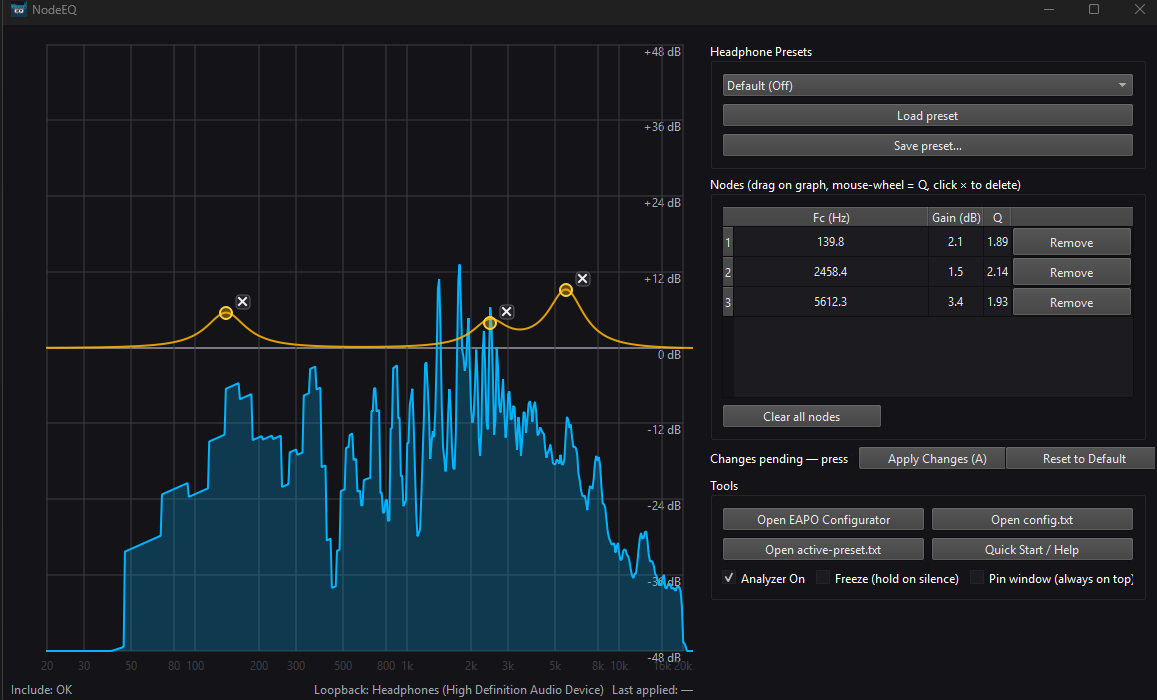
Open NodeEQ on Windows to adjust a band while watching the curve. Compare one small change against bypass on a repeatable route. For a game-specific starting point, browse DoveSonic’s EQ presets.
Translate one filter before converting the whole preset
Suppose a preset uses a peaking filter at 280 Hz with a small cut. In a parametric EQ you can place that filter at 280 Hz and copy its Q. If your graphic EQ only has 250 Hz and 500 Hz sliders, start by adjusting the closer band. Keep the other slider where it was until you compare the effect. Copying the gain to both bands can make the cut wider than intended.
NodeEQ for Windows
Tune the exact bands you want in NodeEQ
Drag filter points while the live spectrum plays behind the curve. NodeEQ lets you adjust frequency, gain and Q and compare the result against bypass on Windows.
Use the converter if your preset needs a different format, then use NodeEQ to refine the filters as you listen.
Get NodeEQ
Frequently asked questions
Does a higher Q make footsteps louder?
Higher Q narrows a peaking filter. Gain determines the boost or cut at its center.
Can I copy parametric values into a graphic EQ?
You can approximate the shape with nearby sliders. Compare the resulting curve and check how it sounds in your game.